SQL Server – Four different T-SQL scripts to get your SQL Server version

Hello everyone.  I just had someone ask me for a script that will return the version of SQL Server.  Off the top of my head I am aware of 4 different ways.  I describe these four different ways of using a script to get SQL Server version below.

If you have another method please feel free to share in the comments.


Method #1: serverproperty()

serverproperty() is a built in system function that returns property information about the server instance.  This function has the ability to return quite a few different properties from your instance of SQL Server but for the purpose of this post I am going to just focus on a few of them.  BOL has a very nice description of this function and the different properties that it can return.

In this script I am returning the following things:

  1. ProductVersion: Version of the instance of SQL Server, in the form of ‘major.minor.build.revision‘.
  2. ProductLevel: Level of the version of the instance of SQL Server. Returns one of the following: ‘RTM’ = Original release version, ‘SPn‘ = Service pack version, ‘CTP’ = Community Technology Preview version.
  3. Edition: Installed product edition of the instance of SQL Server.
select
convert(varchar(128), serverproperty('ProductVersion')) as [InstanceVersion]
, convert(varchar(128), serverproperty('ProductLevel')) as [ProductLevel]
, convert(varchar(128), serverproperty('Edition')) as [Edition];

Here is a sample output from the above query:
Version1


Method #2: @@version

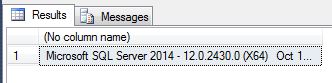
@@version is another system function that returns system and build information for the current installation of SQL Server.

select @@version;

Here is example output from the above query:
version2


Method #3: exec sp_server_info

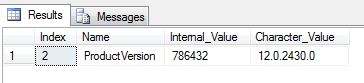
exec sp_server_info is a system procedure that returns a plethora of information about your SQL Server instance.  If you pass it the @attribute_id parameter it will return the specific attribute you are looking for.  The query below will sepecifically return the “DBMS_VER” attribute (which displays instance version information).

exec sp_server_info @attribute_id = 2

Here is the output of the above query:
Version3


Method #4: exec xp_msver

exec xp_msver is another system procedure that returns yet another plethora of info about your SQL Server instance.  Running it without parameters will return several rows with interesting information but, again, for the purpose of this post I am passing it “ProductVersion” as a parameter in the query below:

exec xp_msver 'ProductVersion'

And here is the output from the above query.
Version4

SQL Server – a server trigger to send an email when security changes occur

So I’ve been tasked with a number of security related tasks lately.  Here is another script that I just finished and, once again, I figured that I would share.

Recently someone asked me if they could get an email alert from SQL Server with the details of the action every time a security related change happened on the server.  He wanted the email to trigger on things like a login being created or a user being added to a database or a login being added to a server role, etc.

Below is the script that I wrote to create a server level trigger that would automatically send an email with the pertinent details whenever one of these events occur.  This script will create a SQL Server trigger at the server level that will send an email to the specified email address with details of changes when various security related events happen on the server.

There are a whole cornucopia of different events that you can tell your trigger to fire on.  I chose several that seemed most pertinent to the task at hand.

** If you happen to use the script be sure to update the email address and the mail profile name to the correct values for your environment.

As always, please comment if you have come up with a better solution and would be willing to share.

Enjoy!


USE [master]
GO

create trigger [trig_security_notification] on all server
for ALTER_AUTHORIZATION_SERVER
 , GRANT_SERVER, REVOKE_SERVER
 , CREATE_LOGIN, DROP_LOGIN, ALTER_LOGIN
 , ALTER_AUTHORIZATION_DATABASE -- ******* Comment out this line SQL Server 2005. ******************
 , GRANT_DATABASE, REVOKE_DATABASE -- ******* Comment out this line SQL Server 2005. ******************
 , CREATE_USER, DROP_USER, ALTER_USER -- ******* Comment out this line SQL Server 2005. ******************
 , ADD_SERVER_ROLE_MEMBER, DROP_SERVER_ROLE_MEMBER -- ******* Comment out this line SQL Server 2005. ******************
 , ADD_ROLE_MEMBER , DROP_ROLE_MEMBER -- ******* Comment out this line SQL Server 2005. ******************
 , CREATE_ROLE, DROP_ROLE, ALTER_ROLE -- ******* Comment out this line SQL Server 2005. ******************
as

 declare @EventType nvarchar(512), @SchemaName nvarchar(128), @ObjectName nvarchar(128), @ObjectType nvarchar(128), @DatabaseName nvarchar(128), @CommandText nvarchar(max), @PostTime datetime, @LoginName nvarchar(128), @ServerName nvarchar(128), @suser_sname nvarchar(128);
 declare @body nvarchar(max), @recipients nvarchar(max), @page_recipients nvarchar(max), @subject nvarchar(255), @from_address nvarchar(max), @mailProfile nvarchar(128);

 select @EventType = EVENTDATA().value('(/EVENT_INSTANCE/EventType)[1]', 'nvarchar(512)') --as [EventType]
 , @SchemaName = EVENTDATA().value('(/EVENT_INSTANCE/SchemaName)[1]', 'nvarchar(128)') --as [SchemaName]
 , @ObjectName = EVENTDATA().value('(/EVENT_INSTANCE/ObjectName)[1]', 'nvarchar(128)') --as [ObjectName]
 , @ObjectType = EVENTDATA().value('(/EVENT_INSTANCE/ObjectType)[1]', 'nvarchar(128)') --as [ObjectType]
 , @DatabaseName = EVENTDATA().value(' (/EVENT_INSTANCE/DatabaseName)[1]', 'nvarchar(128)') --as [DatabaseName]
 , @CommandText = EVENTDATA().value('(/EVENT_INSTANCE/TSQLCommand/CommandText)[1]', 'nvarchar(max)') --as [CommandText]
 , @PostTime = EVENTDATA().value('(/EVENT_INSTANCE/PostTime)[1]', 'datetime') --as [PostTime]
 , @LoginName = EVENTDATA().value('(/EVENT_INSTANCE/LoginName)[1]', 'nvarchar(128)') --as [LoginName]
 , @ServerName = EVENTDATA().value('(/EVENT_INSTANCE/ServerName)[1]', 'nvarchar(128)') --as [ServerName]
 , @suser_sname = suser_sname(); --as [UserName];

 SELECT @recipients = 'YourEmail@YourDomain.com', @mailProfile = 'YourServerMailProfileName';
 select @from_address = replace(isnull(convert(nvarchar(128), serverproperty('servername')), convert(nvarchar(128), @@servername)), '\', '_') + '@yourdomain.com'

 set @subject = isnull(@EventType, '') + ' occurred on ' + isnull(@ServerName, convert(nvarchar(128), serverproperty('servername'))) + ' at ' + substring(isnull(convert(varchar(50), @PostTime, 121), ''),1,19) + ' by ' + isnull(isnull(@LoginName, @suser_sname), '') + ' on object ' + isnull(@ObjectName, '') + '. Command text: ' + isnull(@CommandText, '');

 set @body = 'An Security change occurred on SQL Server ' + isnull(@ServerName, convert(nvarchar(128), serverproperty('servername'))) + char(13)+char(10) + char(13)+char(10);
 set @body = @body + 'Event Type: ' + isnull(@EventType, '') + char(13) + char(10);
 set @body = @body + 'Action performed by: ' + isnull(isnull(@LoginName, @suser_sname), '') + char(13) + char(10);
 set @body = @body + 'Object Name: ' + isnull(@ObjectName, '') + char(13) + char(10);
 set @body = @body + 'Object Type: ' + isnull(@ObjectType, '') + char(13) + char(10);
 set @body = @body + 'Command Text: ' + isnull(@CommandText, '') + char(13) + char(10);
 set @body = @body + 'Action occurred at: ' + isnull(convert(varchar(50), @PostTime, 121), '') + char(13) + char(10) + char(13) + char(10);
 set @body = @body + 'Please investigate if this action was not expected.';

 --*******************************************************************
 -- send email
 --*******************************************************************
 if len(@subject) > 255 set @subject = substring(@subject,1,255);
 exec msdb.dbo.sp_send_dbmail @profile_name = @mailProfile, @recipients = @recipients, @from_address = @from_address, @reply_to = @from_address, @subject = @subject, @body = @body, @importance = 'High';
 print @body;

GO

ENABLE TRIGGER [trig_security_notification] ON ALL SERVER
GO

SQL Server – Script out server permissions

Last week I posted a script that would script out all of the database permissions in a particular database in SQL Server.

After going through that exercise I couldn’t resist tackling the server level permissions too.

Here is a script that I created that will script out the server permissions from SQL Server.

If anyone has an approved script or a more streamlined approach I would love to hear about it.

declare @login nvarchar(128);
set @login = '';  -- leave blank for all logins

 select
 case a.[state]
 when 'D' then 'DENY'
 when 'R' then 'REVOKE'
 when 'G' then 'GRANT'
 when 'W' then 'GRANT'
 end + ' ' +
 case a.[type]
 when 'AAES' then 'ALTER ANY EVENT SESSION'
 when 'AAES' then 'ALTER ANY EVENT SESSION'
 when 'ADBO' then 'ADMINISTER BULK OPERATIONS'
 when 'AL' then 'ALTER'
 when 'ALAA' then 'ALTER ANY SERVER AUDIT'
 when 'ALAG' then 'ALTER ANY AVAILABILITY GROUP'
 when 'ALCD' then 'ALTER ANY CREDENTIAL'
 when 'ALCO' then 'ALTER ANY CONNECTION'
 when 'ALDB' then 'ALTER ANY DATABASE'
 when 'ALES' then 'ALTER ANY EVENT NOTIFICATION'
 when 'ALHE' then 'ALTER ANY ENDPOINT'
 when 'ALLG' then 'ALTER ANY LOGIN'
 when 'ALLS' then 'ALTER ANY LINKED SERVER'
 when 'ALRS' then 'ALTER RESOURCES'
 when 'ALSR' then 'ALTER ANY SERVER ROLE'
 when 'ALSS' then 'ALTER SERVER STATE'
 when 'ALST' then 'ALTER SETTINGS'
 when 'ALTR' then 'ALTER TRACE'
 when 'AUTH' then 'AUTHENTICATE SERVER'
 when 'CL' then CASE WHEN a.[class] = 100 THEN 'CONTROL SERVER' ELSE 'CONTROL' END -- SERVER, ENDPOINT, LOGIN
 when 'CO' then 'CONNECT'
 when 'COSQ' then 'CONNECT SQL'
 when 'CRDB' then 'CREATE ANY DATABASE'
 when 'CRDE' then 'CREATE DDL EVENT NOTIFICATION'
 when 'CRHE' then 'CREATE ENDPOINT'
 when 'CRSR' then 'CREATE SERVER ROLE'
 when 'CRTE' then 'CREATE TRACE EVENT NOTIFICATION'
 when 'IM' then 'IMPERSONATE'
 when 'SHDN' then 'SHUTDOWN'
 when 'TO' then 'TAKE OWNERSHIP'
 when 'VW' then 'VIEW DEFINITION'
 when 'VWAD' then 'VIEW ANY DEFINITION'
 when 'VWDB' then 'VIEW ANY DATABASE'
 when 'VWSS' then 'VIEW SERVER STATE'
 when 'XA' then 'EXTERNAL ACCESS ASSEMBLY'
 when 'XU' then 'UNSAFE ASSEMBLY'

 end +
 CASE a.[class]
 WHEN 100 then '' --'SERVER'
 WHEN 101 then ' on login::[' + isnull(d.name,'') + ']' -- server principal
 WHEN 105 then ' on endpoint::[' + isnull(c.name,'') + ']' --'endpoint'
 else ''
 end +
 ' to [' + rtrim(b.name) collate SQL_Latin1_General_CP1_CI_AS + ']' +
 case a.[state]
 when 'W' then ' WITH GRANT OPTION;'
 else ';'
 end
 from sys.server_permissions as [a]
 join sys.server_principals as [b] on b.principal_id = a.grantee_principal_id and (isnull(@login, '') = '' or b.[name] = @login)
 left outer join sys.endpoints as [c] on c.endpoint_id = a.major_id
 left outer join sys.server_principals as [d] on d.principal_id = a.major_id
 where b.[type] <> 'C';

</pre>
<pre>


Thanks!

SQL Server – Script out database permissions

So I recently had a need to script out all of the database permissions for a particular database in SQL Server.  So I just threw together a script that will do this for me.

I thought I would share.  Here you go:


declare @user varchar(128);
set @user = ''; -- leave blank to get permissions for all users;

select
case a.[state]
when 'D' then 'DENY'
when 'R' then 'REVOKE'
when 'G' then 'GRANT'
when 'W' then 'GRANT'
end + ' ' +
case a.[type]
when 'AL' then 'ALTER'
when 'ALAK' then 'ALTER ANY ASYMMETRIC KEY'
when 'ALAR' then 'ALTER ANY APPLICATION ROLE'
when 'ALAS' then 'ALTER ANY ASSEMBLY'
when 'ALCF' then 'ALTER ANY CERTIFICATE'
when 'ALDS' then 'ALTER ANY DATASPACE'
when 'ALED' then 'ALTER ANY DATABASE EVENT NOTIFICATION'
when 'ALFT' then 'ALTER ANY FULLTEXT CATALOG'
when 'ALMT' then 'ALTER ANY MESSAGE TYPE'
when 'ALRL' then 'ALTER ANY ROLE'
when 'ALRT' then 'ALTER ANY ROUTE'
when 'ALSB' then 'ALTER ANY REMOTE SERVICE BINDING'
when 'ALSC' then 'ALTER ANY CONTRACT'
when 'ALSK' then 'ALTER ANY SYMMETRIC KEY'
when 'ALSM' then 'ALTER ANY SCHEMA'
when 'ALSV' then 'ALTER ANY SERVICE'
when 'ALTG' then 'ALTER ANY DATABASE DDL TRIGGER'
when 'ALUS' then 'ALTER ANY USER'
when 'AUTH' then 'AUTHENTICATE'
when 'BADB' then 'BACKUP DATABASE'
when 'BALO' then 'BACKUP LOG'
when 'CL' then 'CONTROL'
when 'CO' then 'CONNECT'
when 'CORP' then 'CONNECT REPLICATION'
when 'CP' then 'CHECKPOINT'
when 'CRAG' then 'CREATE AGGREGATE'
when 'CRAK' then 'CREATE ASYMMETRIC KEY'
when 'CRAS' then 'CREATE ASSEMBLY'
when 'CRCF' then 'CREATE CERTIFICATE'
when 'CRDB' then 'CREATE DATABASE'
when 'CRDF' then 'CREATE DEFAULT'
when 'CRED' then 'CREATE DATABASE DDL EVENT NOTIFICATION'
when 'CRFN' then 'CREATE FUNCTION'
when 'CRFT' then 'CREATE FULLTEXT CATALOG'
when 'CRMT' then 'CREATE MESSAGE TYPE'
when 'CRPR' then 'CREATE PROCEDURE'
when 'CRQU' then 'CREATE QUEUE'
when 'CRRL' then 'CREATE ROLE'
when 'CRRT' then 'CREATE ROUTE'
when 'CRRU' then 'CREATE RULE'
when 'CRSB' then 'CREATE REMOTE SERVICE BINDING'
when 'CRSC' then 'CREATE CONTRACT'
when 'CRSK' then 'CREATE SYMMETRIC KEY'
when 'CRSM' then 'CREATE SCHEMA'
when 'CRSN' then 'CREATE SYNONYM'
when 'CRSO' then 'CREATE SEQUENCE'
when '' then 'Applies to: SQL Server 2012 through SQL Server 2014.'
when 'CRSV' then 'CREATE SERVICE'
when 'CRTB' then 'CREATE TABLE'
when 'CRTY' then 'CREATE TYPE'
when 'CRVW' then 'CREATE VIEW'
when 'CRXS' then 'CREATE XML SCHEMA COLLECTION'
when 'DL' then 'DELETE'
when 'EX' then 'EXECUTE'
when 'IM' then 'IMPERSONATE'
when 'IN' then 'INSERT'
when 'RC' then 'RECEIVE'
when 'RF' then 'REFERENCES'
when 'SL' then 'SELECT'
when 'SN' then 'SEND'
when 'SPLN' then 'SHOWPLAN'
when 'SUQN' then 'SUBSCRIBE QUERY NOTIFICATIONS'
when 'TO' then 'TAKE OWNERSHIP'
when 'UP' then 'UPDATE'
when 'VW' then 'VIEW DEFINITION'
when 'VWCT' then 'VIEW CHANGE TRACKING'
when 'VWDS' then 'VIEW DATABASE STATE'
end +
CASE a.[class]
WHEN 0 then '' --'DATABASE'
WHEN 1 then ' on object::' + case when schema_name(d.[schema_id]) is null then ''
else '[' + schema_name(d.[schema_id]) + '].'
end + '[' + object_name(a.major_id) + ']' +
case when a.minor_id <> 0 then ' (' + rtrim(g.name) + ')'
else '' end -- 'OBJECT_OR_COLUMN'
WHEN 3 then ' on schema::[' + schema_name(a.[major_id]) + ']' --'SCHEMA'
WHEN 4 then ' on user::[' + rtrim(c.name) collate SQL_Latin1_General_CP1_CI_AS + ']' --'DATABASE_PRINCIPAL'
WHEN 5 then ' on assembly::[' + rtrim(h.name) collate SQL_Latin1_General_CP1_CI_AS + ']' --'ASSEMBLY'
WHEN 6 then ' on type::[' + schema_name(i.[schema_id]) + '].[' + rtrim(i.name) collate SQL_Latin1_General_CP1_CI_AS + ']' --'TYPE'
WHEN 10 then ' on xml schema collection::[' + rtrim(j.name) collate SQL_Latin1_General_CP1_CI_AS + ']' --'XML_SCHEMA_COLLECTION'
WHEN 15 then ' on message type::[' + rtrim(s.name) collate SQL_Latin1_General_CP1_CI_AS + ']' --'MESSAGE_TYPE'
WHEN 16 then ' on service contract::[' + rtrim(p.name) collate SQL_Latin1_General_CP1_CI_AS + ']' --'SERVICE_CONTRACT'
WHEN 17 then ' on service::[' + rtrim(q.name) collate SQL_Latin1_General_CP1_CI_AS + ']' --'SERVICE'
WHEN 18 then ' on remote service binding::[' + rtrim(r.name) collate SQL_Latin1_General_CP1_CI_AS + ']' --'REMOTE_SERVICE_BINDING'
WHEN 19 then ' on route::[' + rtrim(n.name) collate SQL_Latin1_General_CP1_CI_AS + ']' --'ROUTE'
WHEN 23 then ' on full text catalog::[' + rtrim(o.name) collate SQL_Latin1_General_CP1_CI_AS + ']' --'FULL_TEXT_CATALOG'
WHEN 24 then ' on symmetric key::[' + rtrim(m.name) collate SQL_Latin1_General_CP1_CI_AS + ']' -- 'SYMMETRIC_KEYS'
WHEN 25 then ' on certificate::[' + rtrim(k.name) collate SQL_Latin1_General_CP1_CI_AS + ']' --'CERTIFICATE'
WHEN 26 then ' on asymmetric key::[' + rtrim(l.name) collate SQL_Latin1_General_CP1_CI_AS + ']' -- 'ASYMMETRIC_KEY'
else ''
end +
' to [' + rtrim(b.name) collate SQL_Latin1_General_CP1_CI_AS + ']' +
case a.[state]
when 'W' then ' WITH GRANT OPTION;'
else ';'
end
from sys.database_permissions as [a]
join sys.database_principals as [b] on b.principal_id = a.grantee_principal_id and (isnull(@user, '') = '' or b.name = @user)
left outer join sys.database_principals as [c] on c.principal_id = a.major_id
left outer join sys.all_objects as [d] on d.[object_id] = a.major_id
left outer join sys.all_objects as [e] on e.[object_id] = a.minor_id
left outer join sys.symmetric_keys as [f] on f.symmetric_key_id = a.major_id
left outer join sys.columns as [g] on g.[object_id] = a.major_id and g.column_id = a.minor_id
left outer join sys.assemblies as [h] on h.assembly_id = a.major_id
left outer join sys.types as [i] on i.user_type_id = a.major_id
left outer join sys.xml_schema_collections as [j] on j.xml_collection_id = a.major_id
left outer join sys.certificates as [k] on k.certificate_id = a.major_id
left outer join sys.asymmetric_keys as [l] on l.asymmetric_key_id = a.major_id
left outer join sys.symmetric_keys as [m] on m.symmetric_key_id = a.major_id
left outer join sys.routes as [n] on n.route_id = a.major_id
left outer join sys.fulltext_catalogs as [o] on o.fulltext_catalog_id = a.major_id
left outer join sys.service_contracts as [p] on p.service_contract_id = a.major_id
left outer join sys.services as [q] on q.service_id = a.major_id
left outer join sys.remote_service_bindings as [r] on r.remote_service_binding_id = a.major_id
left outer join sys.service_message_types as [s] on s.message_type_id = a.major_id


If anyone has a better method of scripting out database permissions I would love to hear it.

Thanks!