
Hello everyone. I just had someone ask me for a script that will return the version of SQL Server. Off the top of my head I am aware of 4 different ways. I describe these four different ways of using a script to get SQL Server version below.
If you have another method please feel free to share in the comments.
Method #1: serverproperty()
serverproperty() is a built in system function that returns property information about the server instance. This function has the ability to return quite a few different properties from your instance of SQL Server but for the purpose of this post I am going to just focus on a few of them. BOL has a very nice description of this function and the different properties that it can return.
In this script I am returning the following things:
- ProductVersion: Version of the instance of SQL Server, in the form of ‘major.minor.build.revision‘.
- ProductLevel: Level of the version of the instance of SQL Server. Returns one of the following: ‘RTM’ = Original release version, ‘SPn‘ = Service pack version, ‘CTP’ = Community Technology Preview version.
- Edition: Installed product edition of the instance of SQL Server.
select
convert(varchar(128), serverproperty('ProductVersion')) as [InstanceVersion]
, convert(varchar(128), serverproperty('ProductLevel')) as [ProductLevel]
, convert(varchar(128), serverproperty('Edition')) as [Edition];
Here is a sample output from the above query:

Method #2: @@version
@@version is another system function that returns system and build information for the current installation of SQL Server.
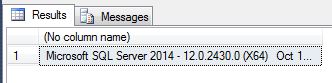
select @@version;
Here is example output from the above query:
Method #3: exec sp_server_info
exec sp_server_info is a system procedure that returns a plethora of information about your SQL Server instance. If you pass it the @attribute_id parameter it will return the specific attribute you are looking for. The query below will sepecifically return the “DBMS_VER” attribute (which displays instance version information).
exec sp_server_info @attribute_id = 2
Here is the output of the above query:

Method #4: exec xp_msver
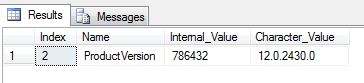
exec xp_msver is another system procedure that returns yet another plethora of info about your SQL Server instance. Running it without parameters will return several rows with interesting information but, again, for the purpose of this post I am passing it “ProductVersion” as a parameter in the query below:
exec xp_msver 'ProductVersion'
And here is the output from the above query.
 The EckMan