SQL Server – Script out server permissions

Last week I posted a script that would script out all of the database permissions in a particular database in SQL Server.

After going through that exercise I couldn’t resist tackling the server level permissions too.

Here is a script that I created that will script out the server permissions from SQL Server.

If anyone has an approved script or a more streamlined approach I would love to hear about it.

declare @login nvarchar(128);
set @login = '';  -- leave blank for all logins

 select
 case a.[state]
 when 'D' then 'DENY'
 when 'R' then 'REVOKE'
 when 'G' then 'GRANT'
 when 'W' then 'GRANT'
 end + ' ' +
 case a.[type]
 when 'AAES' then 'ALTER ANY EVENT SESSION'
 when 'AAES' then 'ALTER ANY EVENT SESSION'
 when 'ADBO' then 'ADMINISTER BULK OPERATIONS'
 when 'AL' then 'ALTER'
 when 'ALAA' then 'ALTER ANY SERVER AUDIT'
 when 'ALAG' then 'ALTER ANY AVAILABILITY GROUP'
 when 'ALCD' then 'ALTER ANY CREDENTIAL'
 when 'ALCO' then 'ALTER ANY CONNECTION'
 when 'ALDB' then 'ALTER ANY DATABASE'
 when 'ALES' then 'ALTER ANY EVENT NOTIFICATION'
 when 'ALHE' then 'ALTER ANY ENDPOINT'
 when 'ALLG' then 'ALTER ANY LOGIN'
 when 'ALLS' then 'ALTER ANY LINKED SERVER'
 when 'ALRS' then 'ALTER RESOURCES'
 when 'ALSR' then 'ALTER ANY SERVER ROLE'
 when 'ALSS' then 'ALTER SERVER STATE'
 when 'ALST' then 'ALTER SETTINGS'
 when 'ALTR' then 'ALTER TRACE'
 when 'AUTH' then 'AUTHENTICATE SERVER'
 when 'CL' then CASE WHEN a.[class] = 100 THEN 'CONTROL SERVER' ELSE 'CONTROL' END -- SERVER, ENDPOINT, LOGIN
 when 'CO' then 'CONNECT'
 when 'COSQ' then 'CONNECT SQL'
 when 'CRDB' then 'CREATE ANY DATABASE'
 when 'CRDE' then 'CREATE DDL EVENT NOTIFICATION'
 when 'CRHE' then 'CREATE ENDPOINT'
 when 'CRSR' then 'CREATE SERVER ROLE'
 when 'CRTE' then 'CREATE TRACE EVENT NOTIFICATION'
 when 'IM' then 'IMPERSONATE'
 when 'SHDN' then 'SHUTDOWN'
 when 'TO' then 'TAKE OWNERSHIP'
 when 'VW' then 'VIEW DEFINITION'
 when 'VWAD' then 'VIEW ANY DEFINITION'
 when 'VWDB' then 'VIEW ANY DATABASE'
 when 'VWSS' then 'VIEW SERVER STATE'
 when 'XA' then 'EXTERNAL ACCESS ASSEMBLY'
 when 'XU' then 'UNSAFE ASSEMBLY'

 end +
 CASE a.[class]
 WHEN 100 then '' --'SERVER'
 WHEN 101 then ' on login::[' + isnull(d.name,'') + ']' -- server principal
 WHEN 105 then ' on endpoint::[' + isnull(c.name,'') + ']' --'endpoint'
 else ''
 end +
 ' to [' + rtrim(b.name) collate SQL_Latin1_General_CP1_CI_AS + ']' +
 case a.[state]
 when 'W' then ' WITH GRANT OPTION;'
 else ';'
 end
 from sys.server_permissions as [a]
 join sys.server_principals as [b] on b.principal_id = a.grantee_principal_id and (isnull(@login, '') = '' or b.[name] = @login)
 left outer join sys.endpoints as [c] on c.endpoint_id = a.major_id
 left outer join sys.server_principals as [d] on d.principal_id = a.major_id
 where b.[type] <> 'C';

</pre>
<pre>


Thanks!

SQL Server – Script out database permissions

So I recently had a need to script out all of the database permissions for a particular database in SQL Server.  So I just threw together a script that will do this for me.

I thought I would share.  Here you go:


declare @user varchar(128);
set @user = ''; -- leave blank to get permissions for all users;

select
case a.[state]
when 'D' then 'DENY'
when 'R' then 'REVOKE'
when 'G' then 'GRANT'
when 'W' then 'GRANT'
end + ' ' +
case a.[type]
when 'AL' then 'ALTER'
when 'ALAK' then 'ALTER ANY ASYMMETRIC KEY'
when 'ALAR' then 'ALTER ANY APPLICATION ROLE'
when 'ALAS' then 'ALTER ANY ASSEMBLY'
when 'ALCF' then 'ALTER ANY CERTIFICATE'
when 'ALDS' then 'ALTER ANY DATASPACE'
when 'ALED' then 'ALTER ANY DATABASE EVENT NOTIFICATION'
when 'ALFT' then 'ALTER ANY FULLTEXT CATALOG'
when 'ALMT' then 'ALTER ANY MESSAGE TYPE'
when 'ALRL' then 'ALTER ANY ROLE'
when 'ALRT' then 'ALTER ANY ROUTE'
when 'ALSB' then 'ALTER ANY REMOTE SERVICE BINDING'
when 'ALSC' then 'ALTER ANY CONTRACT'
when 'ALSK' then 'ALTER ANY SYMMETRIC KEY'
when 'ALSM' then 'ALTER ANY SCHEMA'
when 'ALSV' then 'ALTER ANY SERVICE'
when 'ALTG' then 'ALTER ANY DATABASE DDL TRIGGER'
when 'ALUS' then 'ALTER ANY USER'
when 'AUTH' then 'AUTHENTICATE'
when 'BADB' then 'BACKUP DATABASE'
when 'BALO' then 'BACKUP LOG'
when 'CL' then 'CONTROL'
when 'CO' then 'CONNECT'
when 'CORP' then 'CONNECT REPLICATION'
when 'CP' then 'CHECKPOINT'
when 'CRAG' then 'CREATE AGGREGATE'
when 'CRAK' then 'CREATE ASYMMETRIC KEY'
when 'CRAS' then 'CREATE ASSEMBLY'
when 'CRCF' then 'CREATE CERTIFICATE'
when 'CRDB' then 'CREATE DATABASE'
when 'CRDF' then 'CREATE DEFAULT'
when 'CRED' then 'CREATE DATABASE DDL EVENT NOTIFICATION'
when 'CRFN' then 'CREATE FUNCTION'
when 'CRFT' then 'CREATE FULLTEXT CATALOG'
when 'CRMT' then 'CREATE MESSAGE TYPE'
when 'CRPR' then 'CREATE PROCEDURE'
when 'CRQU' then 'CREATE QUEUE'
when 'CRRL' then 'CREATE ROLE'
when 'CRRT' then 'CREATE ROUTE'
when 'CRRU' then 'CREATE RULE'
when 'CRSB' then 'CREATE REMOTE SERVICE BINDING'
when 'CRSC' then 'CREATE CONTRACT'
when 'CRSK' then 'CREATE SYMMETRIC KEY'
when 'CRSM' then 'CREATE SCHEMA'
when 'CRSN' then 'CREATE SYNONYM'
when 'CRSO' then 'CREATE SEQUENCE'
when '' then 'Applies to: SQL Server 2012 through SQL Server 2014.'
when 'CRSV' then 'CREATE SERVICE'
when 'CRTB' then 'CREATE TABLE'
when 'CRTY' then 'CREATE TYPE'
when 'CRVW' then 'CREATE VIEW'
when 'CRXS' then 'CREATE XML SCHEMA COLLECTION'
when 'DL' then 'DELETE'
when 'EX' then 'EXECUTE'
when 'IM' then 'IMPERSONATE'
when 'IN' then 'INSERT'
when 'RC' then 'RECEIVE'
when 'RF' then 'REFERENCES'
when 'SL' then 'SELECT'
when 'SN' then 'SEND'
when 'SPLN' then 'SHOWPLAN'
when 'SUQN' then 'SUBSCRIBE QUERY NOTIFICATIONS'
when 'TO' then 'TAKE OWNERSHIP'
when 'UP' then 'UPDATE'
when 'VW' then 'VIEW DEFINITION'
when 'VWCT' then 'VIEW CHANGE TRACKING'
when 'VWDS' then 'VIEW DATABASE STATE'
end +
CASE a.[class]
WHEN 0 then '' --'DATABASE'
WHEN 1 then ' on object::' + case when schema_name(d.[schema_id]) is null then ''
else '[' + schema_name(d.[schema_id]) + '].'
end + '[' + object_name(a.major_id) + ']' +
case when a.minor_id <> 0 then ' (' + rtrim(g.name) + ')'
else '' end -- 'OBJECT_OR_COLUMN'
WHEN 3 then ' on schema::[' + schema_name(a.[major_id]) + ']' --'SCHEMA'
WHEN 4 then ' on user::[' + rtrim(c.name) collate SQL_Latin1_General_CP1_CI_AS + ']' --'DATABASE_PRINCIPAL'
WHEN 5 then ' on assembly::[' + rtrim(h.name) collate SQL_Latin1_General_CP1_CI_AS + ']' --'ASSEMBLY'
WHEN 6 then ' on type::[' + schema_name(i.[schema_id]) + '].[' + rtrim(i.name) collate SQL_Latin1_General_CP1_CI_AS + ']' --'TYPE'
WHEN 10 then ' on xml schema collection::[' + rtrim(j.name) collate SQL_Latin1_General_CP1_CI_AS + ']' --'XML_SCHEMA_COLLECTION'
WHEN 15 then ' on message type::[' + rtrim(s.name) collate SQL_Latin1_General_CP1_CI_AS + ']' --'MESSAGE_TYPE'
WHEN 16 then ' on service contract::[' + rtrim(p.name) collate SQL_Latin1_General_CP1_CI_AS + ']' --'SERVICE_CONTRACT'
WHEN 17 then ' on service::[' + rtrim(q.name) collate SQL_Latin1_General_CP1_CI_AS + ']' --'SERVICE'
WHEN 18 then ' on remote service binding::[' + rtrim(r.name) collate SQL_Latin1_General_CP1_CI_AS + ']' --'REMOTE_SERVICE_BINDING'
WHEN 19 then ' on route::[' + rtrim(n.name) collate SQL_Latin1_General_CP1_CI_AS + ']' --'ROUTE'
WHEN 23 then ' on full text catalog::[' + rtrim(o.name) collate SQL_Latin1_General_CP1_CI_AS + ']' --'FULL_TEXT_CATALOG'
WHEN 24 then ' on symmetric key::[' + rtrim(m.name) collate SQL_Latin1_General_CP1_CI_AS + ']' -- 'SYMMETRIC_KEYS'
WHEN 25 then ' on certificate::[' + rtrim(k.name) collate SQL_Latin1_General_CP1_CI_AS + ']' --'CERTIFICATE'
WHEN 26 then ' on asymmetric key::[' + rtrim(l.name) collate SQL_Latin1_General_CP1_CI_AS + ']' -- 'ASYMMETRIC_KEY'
else ''
end +
' to [' + rtrim(b.name) collate SQL_Latin1_General_CP1_CI_AS + ']' +
case a.[state]
when 'W' then ' WITH GRANT OPTION;'
else ';'
end
from sys.database_permissions as [a]
join sys.database_principals as [b] on b.principal_id = a.grantee_principal_id and (isnull(@user, '') = '' or b.name = @user)
left outer join sys.database_principals as [c] on c.principal_id = a.major_id
left outer join sys.all_objects as [d] on d.[object_id] = a.major_id
left outer join sys.all_objects as [e] on e.[object_id] = a.minor_id
left outer join sys.symmetric_keys as [f] on f.symmetric_key_id = a.major_id
left outer join sys.columns as [g] on g.[object_id] = a.major_id and g.column_id = a.minor_id
left outer join sys.assemblies as [h] on h.assembly_id = a.major_id
left outer join sys.types as [i] on i.user_type_id = a.major_id
left outer join sys.xml_schema_collections as [j] on j.xml_collection_id = a.major_id
left outer join sys.certificates as [k] on k.certificate_id = a.major_id
left outer join sys.asymmetric_keys as [l] on l.asymmetric_key_id = a.major_id
left outer join sys.symmetric_keys as [m] on m.symmetric_key_id = a.major_id
left outer join sys.routes as [n] on n.route_id = a.major_id
left outer join sys.fulltext_catalogs as [o] on o.fulltext_catalog_id = a.major_id
left outer join sys.service_contracts as [p] on p.service_contract_id = a.major_id
left outer join sys.services as [q] on q.service_id = a.major_id
left outer join sys.remote_service_bindings as [r] on r.remote_service_binding_id = a.major_id
left outer join sys.service_message_types as [s] on s.message_type_id = a.major_id


If anyone has a better method of scripting out database permissions I would love to hear it.

Thanks!

SQL Server – Query to get DDL changes from default trace

Occasionally I need to read the default trace to get recent DDL changes from SQL Server. Here is a handy query that I wrote to read the default trace look for recent DDL changes.

Here is the query that I use:

SELECT
  a.StartTime as [EventTime]
, a.EndTime
, a.ServerName
, b.name as [EventClass_Descr]
, d.name as [Category_Descr]
, c.subclass_name as [EventSubClass_Descr]
, case isnull(a.ObjectType, -123456)
			when 8259 then 'Check Constraint'
			when 8260 then 'Default (constraint or standalone)'
			when 8262 then 'Foreign-key Constraint'
			when 8272 then 'Stored Procedure'
			when 8274 then 'Rule'
			when 8275 then 'System Table'
			when 8276 then 'Trigger on Server'
			when 8277 then '(User-defined) Table'
			when 8278 then 'View'
			when 8280 then 'Extended Stored Procedure'
			when 16724 then 'CLR Trigger'
			when 16964 then 'Database'
			when 16975 then 'Object'
			when 17222 then 'FullText Catalog'
			when 17232 then 'CLR Stored Procedure'
			when 17235 then 'Schema'
			when 17475 then 'Credential'
			when 17491 then 'DDL Event'
			when 17741 then 'Management Event'
			when 17747 then 'Security Event'
			when 17749 then 'User Event'
			when 17985 then 'CLR Aggregate Function'
			when 17993 then 'Inline Table-valued SQL Function'
			when 18000 then 'Partition Function'
			when 18002 then 'Replication Filter Procedure'
			when 18004 then 'Table-valued SQL Function'
			when 18259 then 'Server Role'
			when 18263 then 'Microsoft Windows Group'
			when 19265 then 'Asymmetric Key'
			when 19277 then 'Master Key'
			when 19280 then 'Primary Key'
			when 19283 then 'ObfusKey'
			when 19521 then 'Asymmetric Key Login'
			when 19523 then 'Certificate Login'
			when 19538 then 'Role'
			when 19539 then 'SQL Login'
			when 19543 then 'Windows Login'
			when 20034 then 'Remote Service Binding'
			when 20036 then 'Event Notification on Database'
			when 20037 then 'Event Notification'
			when 20038 then 'Scalar SQL Function'
			when 20047 then 'Event Notification on Object'
			when 20051 then 'Synonym'
			when 20307 then 'Sequence'
			when 20549 then 'End Point'
			when 20801 then 'Adhoc Queries which may be cached'
			when 20816 then 'Prepared Queries which may be cached'
			when 20819 then 'Service Broker Service Queue'
			when 20821 then 'Unique Constraint'
			when 21057 then 'Application Role'
			when 21059 then 'Certificate'
			when 21075 then 'Server'
			when 21076 then 'Transact-SQL Trigger'
			when 21313 then 'Assembly'
			when 21318 then 'CLR Scalar Function'
			when 21321 then 'Inline scalar SQL Function'
			when 21328 then 'Partition Scheme'
			when 21333 then 'User'
			when 21571 then 'Service Broker Service Contract'
			when 21572 then 'Trigger on Database'
			when 21574 then 'CLR Table-valued Function'
			when 21577 then 'Internal Table (For example, XML Node Table, Queue Table.)'
			when 21581 then 'Service Broker Message Type'
			when 21586 then 'Service Broker Route'
			when 21587 then 'Statistics'
			when 21825 then 'User'
			when 21827 then 'User'
			when 21831 then 'User'
			when 21843 then 'User'
			when 21847 then 'User'
			when 22099 then 'Service Broker Service'
			when 22601 then 'Index'
			when 22604 then 'Certificate Login'
			when 22611 then 'XMLSchema'
			when 22868 then 'Type'
            when -123456 then case when a.EventClass in (108, 104) then 'Login' when a.EventClass in (109, 110) then 'User' else 'Unknown' end
            else 'Unknown'
          end as [ObjectType_Description]
, a.DatabaseName
, a.ObjectName
, a.LoginName
, a.NTUserName
, a.NTDomainName
, a.HostName
, a.ApplicationName
, a.DBUserName

, a.TargetUserName
, a.TargetLoginName
, a.RoleName

, convert(nvarchar(max), a.TextData) as [TextData]
, a.DatabaseID
, a.ObjectID        -----------------------
, a.IndexID
, a.Duration

FROM    sys.fn_trace_gettable(CONVERT(nvarchar(256), (SELECT case when charindex('_', convert(nvarchar(256), f.value)) = 0 then convert(nvarchar(256), f.value) else substring(convert(nvarchar(256), f.value), 1, charindex('_', convert(nvarchar(256), f.value))-1) end + '.trc'
                                                      FROM    sys.fn_trace_getinfo(1) f
                                                      WHERE   f.property = 2
                                                    )), DEFAULT) as [a]

        left outer JOIN sys.trace_events as [b] ON a.EventClass = b.trace_event_id
        left outer JOIN sys.trace_subclass_values c ON c.trace_event_id = b.trace_event_id
                                            AND c.subclass_value = a.EventSubClass
		left outer join sys.trace_categories as [d] on d.category_id = b.category_id
WHERE a.DatabaseName <> 'tempdb'
  and isnull(a.EventClass, -123456) in (46, --	Object:Created	Objects
										 47,  --	Object:Deleted	Objects
										 164 -- Object:Altered
)
  and isnull(a.ObjectType,0) <> 21587   -- don't get auto-statistics as it generates too much noise
order by a.StartTime desc

Capture

SQL Server – Find the size of database file – Find the size of log file

As a DBA you may sometimes have the need to gather some stats on the sizes of files in your databases.  Once again Microsoft has been kind enough to provide us with some handy tools get get at this information without having to use the clunky GUI.

If you are just simply looking for the size of the files and are not concerned about finding the used space and free space you can simply use the sys.master_files DMV.  This DMV has a column named “size” which represents the number of 8k pages in the database file.  To get to MB you would simply multiply size times 8 and then divide the total by 1024.  I like to throw in some rounding and conversion to make my result more readable.

Here is an example.

select db_name(database_id) as [DatabaseName]
, name as [Logical_Name]
, convert(decimal(18,2), round(((size * 8) / 1024.00),2)) as [SizeMB]
from sys.master_files
where db_name(database_id) = 'AdventureWorks2014'

And here are the results:

Capture

But what if I also want to determine the used space and free space in the file?

Well, its always been a bit of a source of irritation for me that this information cannot be obtained from sys.master_files.  Just seems like it would have been something that could have been included in this DMV and it would make it so much easier when trying to include this information in reports, queries, etc… but at least there is, in fact, still a pretty simple way to get at this info.

To get database file used space and free space we can use dbcc showfilestats.  When you execute this statement you will see columns named “TotalExtents” and “UsedExtents“.  These columns represent the number of 64k extents in the databse file.  So, for example, if you wanted to convert TotalExtents to MB you would need to multiply TotalExtents by 64 and then divide the total by 1024.   Again, I like to throw in some rounding and conversion to make my result more readable.  Unfortunately dbcc showfilestats will only display information for database files in the current database and it also does not include information about the log files, and since it is a DBCC command it’s not as easy to use it in select statements.  So first we will look at the output from the dbcc command and then I will show you a query that gives you the info in a format that is more useful.

To run this command you would just simply execute the following statement:

dbcc showfilestats with no_infomsgs;

And the result:

Capture2

As you can see, unless you are used to thinking in terms of EXTENTS instead of MB or GB, this isn’t very helpful.  So, as promised, here is another query that will take the results of the dbcc command and dump it into a temp table and then do the conversion for us:


use AdventureWorks2014;
go
if (select object_id('tempdb..#tempFileSize')) is not null
drop table #tempFileSize;

create table #tempFileSize (Fileid int, [FileGroup] int, TotalExtents bigint, UsedExtents bigint, Name nvarchar(128), [FileName] nvarchar(260))

declare @sql nvarchar(max);
set @sql = 'dbcc showfilestats with no_infomsgs;'

insert into #tempFileSize exec(@sql);
select db_name() as [DatabaseName],
 Name as [Logical_Name],
 convert(decimal(18,2), round(((TotalExtents * 64) / 1024.0),2)) as [TotalMB],
 convert(decimal(18,2), round(((UsedExtents * 64) / 1024.0),2)) as [UsedMB],
 convert(decimal(18,2), round((((TotalExtents - UsedExtents) * 64) / 1024.0),2)) as [FreeMB]
from #tempFileSize

And the results:

Capture3


SQL Server – Query to get drive free space from SQL Server

Question:

How can I query SQL Server to get the drive space free, drive space used and total drive size.

Answer:

Beginning with SQL Server 2008R2 Microsoft introduced a new system DMF (dynamic management function) named sys.dm_os_volume_stats.  This DMF returns information about the operating system volume (directory) on which the specified databases and files are stored in SQL Server. You can use this dynamic management function to check the attributes of the physical disk drive or return available free space information about the directory.

This DMF takes two arguments:

  1. database_id – The ID of the database. database_id is int, with no default. Cannot be NULL.
  2. file_id – The ID of the file. file_id is int, with no default. Cannot be NULL.

You can join this DMF to the sys.master_files DMV to get the drive space usage statistics for the drives where you have a database file stored.


-----------------------------------------

select distinct
convert(varchar(512), b.volume_mount_point) as [volume_mount_point]
, convert(varchar(512), b.logical_volume_name) as [logical_volume_name]
, convert(decimal(18,1), round(((convert(float, b.available_bytes) / convert(float, b.total_bytes)) * 100),1)) as [percent_free]
, convert(bigint, round(((b.available_bytes / 1024.0)/1024.0),0)) as [free_mb]
, convert(bigint, round(((b.total_bytes / 1024.0)/1024.0),0)) as [total_mb]
, convert(bigint, round((((b.total_bytes - b.available_bytes) / 1024.0)/1024.0),0)) as [used_mb]
from sys.master_files as [a]
CROSS APPLY sys.dm_os_volume_stats(a.database_id, a.[file_id]) as [b]

-----------------------------------------

Here are the results:

DriveSpace

** One word of caution is that sys.dm_os_volume_stats will only produce stats for drives where a SQL Server database exists.


Another question: But… what if I am using SQL Server 2008 or older?

Another Answer: xp_fixeddrives

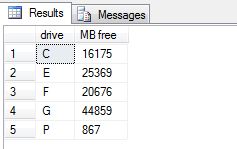
This extended stored procedure is not as useful regarding the information that it gives – only showing free space.  However, it DOES include all of the fixed drives on the server instead of just the drives where a SQL Server database exists.


------------------------------------

exec master.dbo.xp_fixeddrives

------------------------------------

Here are the results:

DriveSpace2

SQL Query to Get SQL Server CPU Utilization

For a quick and dirty way to get the CPU utilization from SQL Server you can use the sys.dm_os_ring_buffers DMV.

The DMV sys.dm_os_ring_buffers maintains approximately 1000 records, before wrapping around and replacing the oldest entries first. It exposes four columns but we’re primarily only interested in one of them, record, which contains XML data.

Here is a quick query to get CPU utilization from the SQL Server.


-------------------------------------------

select top 1
(convert(xml, record)).value('(./Record/SchedulerMonitorEvent/SystemHealth/SystemIdle)[1]', 'int') as [cpuIdle],
(convert(xml, record)).value('(./Record/SchedulerMonitorEvent/SystemHealth/ProcessUtilization)[1]', 'int') as [cpuSQLProcessUtilization],
100 - (convert(xml, record)).value('(./Record/SchedulerMonitorEvent/SystemHealth/SystemIdle)[1]', 'int') - (convert(xml, record)).value('(./Record/SchedulerMonitorEvent/SystemHealth/ProcessUtilization)[1]', 'int') as [CPUOtherProcessUtilization]

from sys.dm_os_ring_buffers a
where a.ring_buffer_type = N'RING_BUFFER_SCHEDULER_MONITOR'
and a.record like '%<SystemHealth>%'
order by (convert(xml, record)).value('(./Record/@id)[1]', 'int') desc;

--------------------------------------------

Executing the above query will give you a result similar to the following:

CPUUtilization

One caveat about using this method though is that the ring buffer reports CPU usage once per minute.  This means that this is not necessarily “real time”, but will always be within 1 minute or less of the moment when the query was executed.

If you wanted to get the CPU usage for the last ten minutes you could take the above query and change the ‘top’ clause from a 1 to a 10.  Like so:


-------------------------------------------

select top 10
(convert(xml, record)).value('(./Record/SchedulerMonitorEvent/SystemHealth/SystemIdle)[1]', 'int') as [cpuIdle],
(convert(xml, record)).value('(./Record/SchedulerMonitorEvent/SystemHealth/ProcessUtilization)[1]', 'int') as [cpuSQLProcessUtilization],
100 - (convert(xml, record)).value('(./Record/SchedulerMonitorEvent/SystemHealth/SystemIdle)[1]', 'int') - (convert(xml, record)).value('(./Record/SchedulerMonitorEvent/SystemHealth/ProcessUtilization)[1]', 'int') as [CPUOtherProcessUtilization]

from sys.dm_os_ring_buffers a
where a.ring_buffer_type = N'RING_BUFFER_SCHEDULER_MONITOR'
and a.record like '%<SystemHealth>%'
order by (convert(xml, record)).value('(./Record/@id)[1]', 'int') desc;

--------------------------------------------

As you can see from the screen shot below we now receive the CPU usage statistics for the last 10 minutes.

CPUUtilization2

How do I find statements that are currently executing in SQL Server?

Question:

How do I find the statements that are executing in SQL Server?

Answer:

For such a task Microsoft has been kind enough to provide us with some pretty handy DMVs (Dynamic Management Views).
Below we will use the following DMVs and Table-valued functions:

  1. sys.dm_exec_requests – Returns information about each request that is executing within SQL Server.
  2. sys.dm_exec_sql_text – A table-valued function that returns the text of the SQL batch that is identified by the specified sql_handle. This table-valued function replaces the system function fn_get_sql. We can use this to get the text of the full batch as well as the specific currently executing statement within the batch.
  3. sys.dm_exec_query_plan – A table-valued function that returns the Showplan in XML format for the batch specified by the plan handle. The plan specified by the plan handle can either be cached or currently executing.
  4. sys.dm_exec_sessions – Returns one row per authenticated session on SQL Server. sys.dm_exec_sessions is a server-scope view that shows information about all active user connections and internal tasks.

Here is a query that I like to use to find the currently executing statements in SQL Server:

-----------------------------------------------------
select
  a.session_id
, a.blocking_session_id
, a.wait_type
, a.wait_resource
, a.wait_time
, a.start_time
, datediff(second, a.start_time, getdate()) as [duration_second]
, d.login_time
, d.last_request_start_time
, d.[status]
, d.login_name
, d.nt_domain
, d.nt_user_name
, d.[host_name]
, d.[program_name]

, DB_NAME(a.database_id) AS [database_name]
, OBJECT_SCHEMA_NAME(b.objectid, a.database_id) AS [schema_name]
, OBJECT_NAME(b.objectid, a.database_id) AS [object_name]

, b.[text] AS [FullSQLBatch]
, CASE a.statement_end_offset
			WHEN -1 THEN SUBSTRING(b.[text], (a.[statement_start_offset] / 2) + 1, 2147483647)
			WHEN 0 THEN b.[text]
			ELSE SUBSTRING(b.[text], (a.[statement_start_offset] / 2) + 1, (a.[statement_end_offset] - a.[statement_start_offset]) / 2)
			END AS [ActiveStatement]
, c.query_plan

, a.open_transaction_count
, a.open_resultset_count
, a.percent_complete
, a.reads
, a.writes
, a.logical_reads
, a.granted_query_memory

FROM sys.dm_exec_requests AS a
   OUTER APPLY sys.dm_exec_sql_text(a.[sql_handle]) AS b
   OUTER APPLY sys.dm_exec_query_plan(a.plan_handle) AS c
   LEFT JOIN sys.dm_exec_sessions AS d ON a.session_id = d.session_id
WHERE a.session_id >= 50
  and a.session_id <> @@spid
-----------------------------------------------------

 

Here is another iteration of the above statement. This one will also include information about the blocker (if there is one).

<pre>-----------------------------------------------------
select
  a.session_id
, a.blocking_session_id
, a.wait_type
, a.wait_resource
, a.wait_time
, a.start_time
, datediff(second, a.start_time, getdate()) as [duration_second]
, d.login_time
, d.last_request_start_time
, d.[status]
, d.login_name
, d.nt_domain
, d.nt_user_name
, d.[host_name]
, d.[program_name]

, DB_NAME(a.database_id) AS [database_name]
, OBJECT_SCHEMA_NAME(b.objectid, a.database_id) AS [schema_name]
, OBJECT_NAME(b.objectid, a.database_id) AS [object_name]

, b.[text] AS [FullSQLBatch]
, CASE a.statement_end_offset
			WHEN -1 THEN SUBSTRING(b.[text], (a.[statement_start_offset] / 2) + 1, 2147483647)
			WHEN 0 THEN b.[text]
			ELSE SUBSTRING(b.[text], (a.[statement_start_offset] / 2) + 1, (a.[statement_end_offset] - a.[statement_start_offset]) / 2)
			END AS [ActiveStatement]
, c.query_plan

, a.open_transaction_count
, a.open_resultset_count
, a.percent_complete
, a.reads
, a.writes
, a.logical_reads
, a.granted_query_memory

, '***** blocker info *****' as [***** blocker info *****]
, f.session_id as [blocker_session_id]
, f.blocking_session_id as [blocker_blocking_session_id]
, f.wait_type as [blocker_wait_type]
, f.wait_resource
, f.wait_time as [blocker_wait_time]
, f.start_time as [blocker_start_time]
, datediff(second, f.start_time, getdate()) as [blocker_duration_second]
, e.login_time as [blocker_login_time]
, e.last_request_start_time as [blocker_last_request_start_time]
, e.[status] as [blocker_status]
, e.login_name as [blocker_login_name]
, e.nt_domain as [blocker_nt_domain]
, e.nt_user_name as [blocker_nt_user_name]
, e.[host_name] as [blocker_host_name]
, e.[program_name] as [blocker_program_name]

, DB_NAME(f.database_id) AS [blocker_database_name]
, OBJECT_SCHEMA_NAME(h.objectid, f.database_id) AS [blocker_schema_name]
, OBJECT_NAME(h.objectid, f.database_id) AS [blocker_object_name]

, h.[text] AS [blocker_FullSQLBatch]
, CASE f.statement_end_offset
			WHEN -1 THEN SUBSTRING(h.[text], (f.[statement_start_offset] / 2) + 1, 2147483647)
			WHEN 0 THEN h.[text]
			ELSE SUBSTRING(h.[text], (f.[statement_start_offset] / 2) + 1, (f.[statement_end_offset] - f.[statement_start_offset]) / 2)
			END AS [blocker_ActiveStatement]
, g.query_plan as [blocker_query_plan]

, f.open_transaction_count as [blocker_open_transaction_count]
, f.open_resultset_count as [blocker_open_resultset_count]
, f.percent_complete as [blocker_percent_complete]
, f.reads as [blocker_reads]
, f.writes as [blocker_writes]
, f.logical_reads as [blocker_logical_reads]
, f.granted_query_memory as [blocker_granted_query_memory]

FROM sys.dm_exec_requests AS a
    OUTER APPLY sys.dm_exec_sql_text(a.[sql_handle]) AS b
    OUTER APPLY sys.dm_exec_query_plan(a.plan_handle) AS c
    LEFT JOIN sys.dm_exec_sessions AS d ON a.session_id = d.session_id

    left outer join sys.dm_exec_sessions as [e] on e.session_id = a.blocking_session_id
    left outer join sys.dm_exec_requests as [f] on f.session_id = a.blocking_session_id
    outer apply sys.dm_exec_query_plan(f.plan_handle) as [g]
    outer apply sys.dm_exec_sql_text(f.[sql_handle]) as [h]
WHERE a.session_id >= 50
  and a.session_id <> @@spid
-----------------------------------------------------


Three simple ways to use a SQL query to return the text of your stored procedure, function, view, etc.

Below are three simple ways to use a SQL query to get the text of a stored procedure, trigger, function, etc.

Method #1: SYS.SQL_MODULES

sys.sql_modules is a system DMV (Dynamic Management View) that returns a row for each object that is an SQL language-defined module in SQL Server. Objects of type P, RF, V, TR, FN, IF, TF, and R have an associated SQL module.

Here is an example:

-----------------------------------
select a.[definition] from sys.sql_modules as [a]
 join sys.objects as [b] on b.[object_id] = a.[object_id]
where b.name = 'YourStoredProcedureName';
-----------------------------------


Method #2: sp_helptext

sp_helptext is a built-in stored procedure that displays the definition of a user-defined rule, default, unencrypted Transact-SQL stored procedure, user-defined Transact-SQL function, trigger, computed column, CHECK constraint, view, or system object such as a system stored procedure.

Here is an example:

-----------------------------------
exec sp_helptext @objname = 'YourStoredProcedureName';
-----------------------------------


Method #3: sys.syscomments

sys.syscomments contains entries for each view, rule, default, trigger, CHECK constraint, DEFAULT constraint, and stored procedure within the database. The text column contains the original SQL definition statements.

Here is an example:

-----------------------------------
select a.[text] from sys.syscomments as [a]
 join sys.sysobjects as [b] on b.id = a.id
where b.name = 'YourStoredProcedureName';
-----------------------------------

SQL Script to set the database recovery model in SQL Server

If you would like to change the database recovery model on your SQL Server database you can use the ALTER DATABASE command.

To set your database recovery model to full you can execute the following statement:

-----------------------------------
ALTER DATABASE [test] SET RECOVERY FULL WITH NO_WAIT;
-----------------------------------

To set your database recovery model to simple you can execute the following statement:

-----------------------------------
ALTER DATABASE [test] SET RECOVERY SIMPLE WITH NO_WAIT;
-----------------------------------

To set your database recovery model to bulk logged you can execute the following statement:

-----------------------------------
ALTER DATABASE [test] SET RECOVERY BULK_LOGGED WITH NO_WAIT;
-----------------------------------

SQL Server – Backup the Reporting Services Encryption Key from a command prompt using rskeymgmt.exe

If you would like to backup your SQL Server Reporting Services encryption key from a command prompt you can use rskeymgmt.exe to accomplish this. Here is the syntax:

rskeymgmt.exe -e -f “C:\KeyBackup\RSKey.snk” -p “YourStrongPassword”

In the above command:
-e = Extracts a key from a report server instance.
-f = Full path and file name to read/write key.
-p = Password used to encrypt or decrypt key.

RSKeyMgmt has many other functions as well. Here are the other parameters you can pass to it:

-e = extract – Extracts a key from a report server instance
-a = apply – Applies a key to a report server instance
-s = reencrypt – Generates a new key and reencrypts all encrypted content
-d = delete content – Deletes all encrypted content from a report server database
-l = list – Lists the report servers announced in the report server database
-r = installation ID – Remove the key for the specified installation ID
-j = join – Join a remote instance of report server to the scale-out deployment of the local instance
-i = instance – Server instance to which operation is applied. Default is MSSQLSERVER
-f = file – Full path and file name to read/write key.
-p = password – Password used to encrypt or decrypt key.
-m = machine name – Name of the remote machine to join to the scale-out deployment
-n = instance name – Name of the remote machine instance to join to the scale-out deployment
-u = user name – User name of an administrator on the machine to join to the scale-out deployment. If not supplied, the current user is used.
-v = password – Password of an administrator on the machine to join to the scale-out deployment
-t = trace – Include trace information in error message

You can get all of the above in addition to examples by running:
RSKeyMgmt.exe /?
